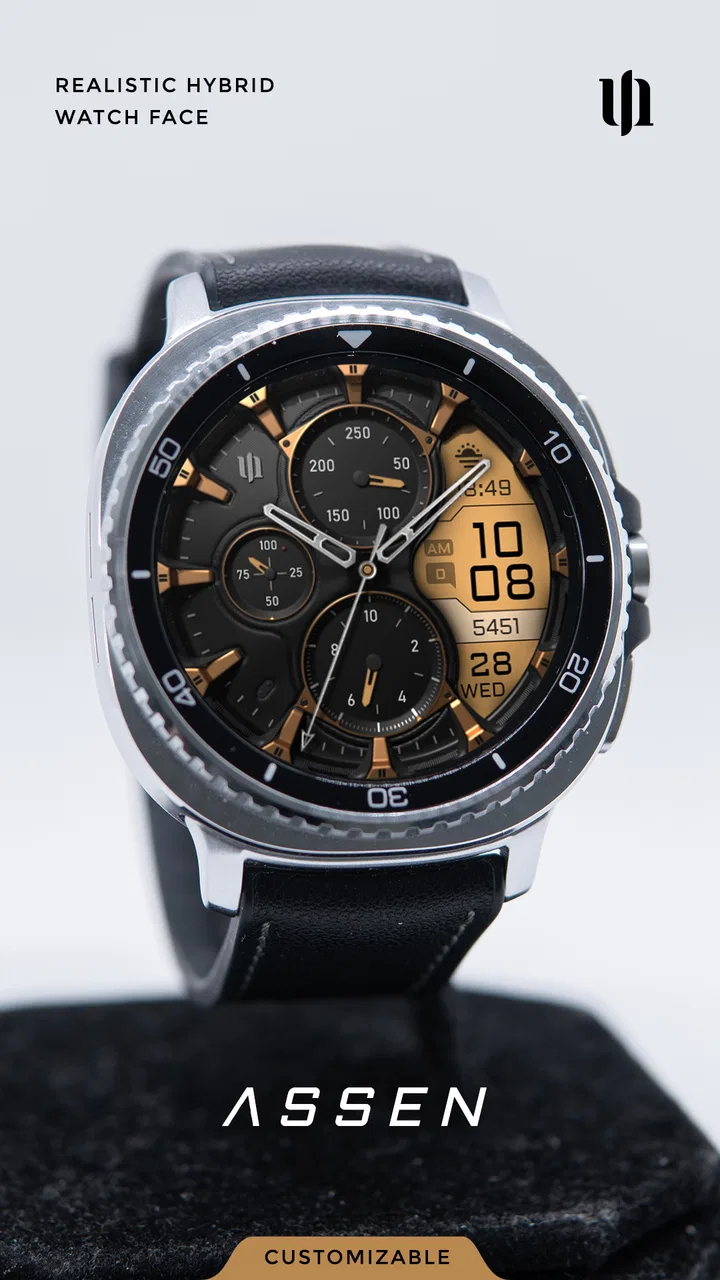
S4U Assen - Hybrid watch face
- 4.5
- Rating
- 100.00K
- Installs
- $1.99
- Price
 Analysis by App-foxy
Choosing a watch face is usually less about finding the most complicated design and more about finding one that remains useful after the first day. I spent time with S4U Assen, a personalization app from styles4you, and found that its appeal comes from balancing a sporty, realistic look with enough adjustment to make the display feel like my own. It is built for compatible smartwatches rather than phones alone, so the quality of the experience depends heavily on how smoothly the face reaches the watch and how comfortable the final layout is during everyday use.
The basic idea is easy to understand: you get a hybrid watch face that combines the appearance of physical watch elements with digital information. That makes it a more traditional-looking choice than a plain digital screen, while still giving you the convenience of readable data at a glance. I would describe it as a practical personalization tool for someone who wants character on the wrist without moving into an overly decorative or novelty design.
Where the first setup can become confusing
The first point that can trip people up is the difference between installing a watch-face app and installing an ordinary phone app. S4U Assen is listed in the personalization category, but its real destination is the watch. If you expect the face to behave like a normal mobile application with a prominent interface on your phone, the process can feel less obvious. I found it more useful to think of the phone as the delivery and configuration part of the experience, while the watch is where the result matters.
You May Also Like

 Blood Strike: 2.5 Anniversary
Blood Strike’s Loadouts Turn Every Drop Into a Tactical Gamble
A close look at Blood Strike’s custom loadouts: how fast access to signature weapons reshapes its battle royale rhythm, rewards preparation, and narrows the gap between fights.

 Pandora - Music & Podcasts
Pandora’s Music Is Easy to Start, but Harder to Recover
Pandora’s strength is its low-effort path from a seed to a station. Its weak spot is how much confidence it asks you to place in connection, setup, and quiet recovery.

 8 Ball Pool
8 Ball Pool Is Built on Rivalries, Rematches, and Routine
A close look at the rivalries, rematches, shared routines, and unanswered safety questions that turn a quick pool match into a persistent mobile community.

 Samsung Music
Samsung Music’s Quiet Strength Is Playing What You Already Own
Its reach comes less from spectacle than from dependable access to a personal library. That simplicity is both the app’s strongest retention engine and its ceiling.

 AccuWeather: Weather Radar
AccuWeather Review: A Quick, Clear Forecast for Everyday Decisions
For everyday plans, the best forecast is the one you can understand quickly. AccuWeather makes rain timing, radar, and local conditions easy to act on, with a few trade-offs.

 Hill Climb Racing
Why Hill Climb Racing Still Turns Crashes Into One More Run
A tiny car, a bumpy hill and one more upgrade: Hill Climb Racing keeps resurfacing because its simple chaos makes every near-miss feel personal.
More From Our News Desk



Another source of friction is compatibility. A watch face can be well designed and still fail to appear if the connected watch, companion application, or operating system does not support that particular format. This is not a flaw unique to styles4you, but it is an important distinction before paying for any watch face. I would check the supported watch ecosystem and installation route first, especially if your watch is older, recently reset, or connected through a different companion app than usual.
The purchase price is $1.99, which places it in the inexpensive paid-watch-face range rather than the free-customization category. That matters because I would not approach it as something to install casually on every device. It makes more sense when you already know that a hybrid design suits your wrist and you want a focused face instead of browsing through a large collection of unrelated styles.
Once the face is installed, the second adjustment is visual rather than technical. Realistic hybrid faces often use more visual elements than a minimalist digital face, and that can make small information fields feel crowded. I recommend wearing it for a full day before deciding whether the arrangement works. A design that looks impressive in a store preview may be less comfortable when checked outdoors, while walking, or during a quick glance at a dimly lit screen.
In my use, the strongest reason to choose this style is that it does not make the watch feel like a tiny phone screen. The physical-watch influence gives it a more familiar presence, which works well with casual clothes, office wear, and situations where a plain digital display feels too technical. The trade-off is that the visual realism needs a little more attention from the wearer. If your only priority is the largest possible time digits, a simpler digital face may be the better option.
Checks that save time before installation
Before installing, I would make three quick checks. First, confirm that the watch is paired and visible in its normal companion application. Second, make sure the watch has enough battery to complete an installation without interrupting the transfer. Third, look at the current watch-face selection screen so you know where a newly installed face should appear. These are ordinary steps, but they prevent a common mistake: assuming the purchase failed when the face was actually installed and simply not selected.
I also recommend checking whether the watch is currently connected through Bluetooth or another supported connection method. If the phone can show general watch information but cannot send a new face, the problem may be the connection state rather than S4U Assen itself. Toggling the connection, reopening the companion app, and waiting for the watch to synchronize is a safer first response than repeatedly buying or reinstalling anything.
Because the app is rated for Everyone, I see it as suitable for a broad audience, including someone buying a first paid watch face. That age classification does not remove the need to check device compatibility, though. Age suitability and technical compatibility are separate questions, and confusing them is one reason people can have an unnecessarily frustrating first experience.
After installation, select the face directly on the watch if the companion application does not switch to it automatically. Watch platforms differ in how they handle newly added faces, and a successful download does not always mean the new design becomes active immediately. I prefer to confirm the face from the watch itself, then return to the phone only for any available personalization controls.
A useful setup habit is to take a quick look at the display in the conditions where you normally wear the watch. Try indoors, outside, and with the screen at its usual brightness. This reveals whether the hands, background, and digital information compete with one another. It also helps you decide whether a more detailed realistic face is genuinely useful for you or merely attractive in a preview.
How I recover when the face does not appear
If S4U Assen does not show up after installation, I would avoid assuming that the app is broken. I would first open the watch’s face list and scroll through the recently added designs. Some platforms place downloaded faces in a separate section, and the list may not refresh until the companion application is reopened. A restart of the watch and phone can also clear a temporary synchronization delay without changing any personal settings.
If the face appears on the phone but not on the watch, I would check the connection before repeating the installation. Keep the devices close together, open the normal watch companion application, and allow it time to finish its synchronization. If there is a pending system update or an interrupted transfer, completing that basic maintenance can matter more than changing anything inside the watch-face app.
If the face reaches the watch but looks different from the preview, I would inspect the selected display mode and available customization controls. A hybrid design can change its impression significantly when a color, background, or information arrangement is adjusted. I would also check whether the watch is showing a low-power or simplified display state. What looks like a missing element may simply be a reduced screen mode intended to conserve battery.
There is a practical recovery rule I follow with paid digital items: do not uninstall immediately unless necessary. First note whether the face is visible in the watch’s installed-face list, whether it can be selected, and whether the issue occurs only during transfer. This separates an installation problem from a display or selection problem and reduces the chance of losing track of what has already completed.
If reinstalling is genuinely needed, I would do it through the same store and companion-app route used for the original installation. Mixing multiple installation paths can make troubleshooting harder because the phone, watch, and store may not agree about the current state. Keeping the process consistent gives you a clearer result after each step.
Separating watch behavior from app problems
Not every inconvenience that appears after choosing a new face is caused by S4U Assen. If the entire watch feels slow, fails to synchronize other information, or disconnects from the phone, the broader connection or device software deserves attention. A single watch face can expose an existing problem because it prompts you to interact with the device, but that does not prove it created the problem.
Battery behavior also needs a fair comparison. A realistic hybrid face may keep more visual detail on screen than an extremely simple face, but battery life is influenced by the watch model, screen technology, brightness, connection activity, and the device’s own power settings. I would compare it with the watch’s default face over a normal day rather than judging it after a short period of heavy setup and repeated screen checks.
Notifications, health readings, and other watch functions belong to the watch platform and its companion software. S4U Assen changes the face you look at; it should not be treated as a replacement for the system that supplies those services. If one of those functions stops updating, I would test the default face and the companion application before blaming the personalization app.
There is also a difference between a face not showing information and information not being available. A field can look empty because the watch has not synchronized, because a setting is disabled elsewhere, or because the relevant data is not supported on that device. I would verify the underlying watch service first. That approach is especially helpful when moving the same face between different watch models, where the available data can vary.
One of the less obvious trade-offs is that customization can improve usefulness while reducing visual calm. I like using a detailed face when I want several pieces of information available without opening another screen, but I would not fill every possible area just because the controls allow it. Leaving one area visually quiet can make the time easier to read and preserve the traditional-watch character that attracted me in the first place.
Everyday use and the right kind of owner
A realistic everyday scenario is a workday where I check the time during meetings, glance at the display while walking between rooms, and want a small amount of context without pulling out my phone. The hybrid treatment fits that routine because it feels less distracting than a bright, highly digital design. At the same time, I would choose a cleaner option for exercise-focused use if my main concern were reading large activity figures quickly while moving.
It also suits someone who changes watch straps or clothing and wants a face with enough personality to feel intentional. The traditional styling can bridge the gap between a smartwatch and an ordinary wristwatch, which is useful when the device is worn in more formal settings. I would be less enthusiastic for a user who wants a playful collection of animated designs or who changes faces several times a day; a focused, realistic face is not trying to serve that purpose.
Compared with the default face supplied by a watch manufacturer, S4U Assen offers a stronger sense of visual identity and a more watch-like presentation. The default usually wins on immediate familiarity and guaranteed integration, while this paid option is more appealing when the standard choices feel bland. Compared with a free digital face, it gives up some instant simplicity in exchange for a more tactile, conventional appearance.
The developer, styles4you, has made a face that is easy to understand once it is active, but the setup still depends on the watch platform’s rules. That is why I would judge it on two levels: the design itself and the path required to get it onto the wrist. If your watch ecosystem handles paid faces cleanly, the experience is straightforward. If your device frequently struggles with synchronization, the same purchase may feel more troublesome than its modest price suggests.
The public response is encouraging, with a 4.5 average from around 3.2 thousand ratings and over 100 thousand installs. I treat those figures as a sign that the concept has found an audience, not as a guarantee that every watch or personal taste will match it. The app was released on August 10, 2023, so I would still pay attention to how well it fits your current watch software rather than assuming age alone tells you anything about compatibility.
For a first-time buyer, my best practical advice is to decide what you need to read during a normal glance before changing anything. If time readability comes first, keep the layout restrained. If you want the face to replace a quick phone check, experiment with the available information areas one at a time. This makes it easier to identify which adjustment helped and avoids ending up with a crowded display that looks impressive but slows down reading.
I would skip it if you strongly prefer a completely flat digital interface, need a face designed specifically around training metrics, or dislike paying for individual watch faces. I would also skip it if your watch is difficult to synchronize and you are unwilling to spend a few minutes checking the connection and installed-face list. In those cases, the manufacturer’s default face or a platform-integrated free alternative will probably offer less friction.
My practical verdict
S4U Assen is a good choice when you want a smartwatch to look more like a conventional watch without giving up digital convenience. I like its hybrid direction because it gives the wrist a more finished, everyday appearance than many purely digital alternatives. The customization is most valuable when used selectively: a few useful details can make the face practical, while too many can undermine its readability.
The main weakness is not the idea but the setup dependency. Installation, selection, synchronization, and display behavior can involve the watch’s companion system as much as the app itself. Knowing that in advance makes the experience easier. I would check compatibility, keep the watch connected, select the face manually if needed, and test it in real lighting before deciding whether it belongs on my daily watch.
At $1.99, I see it as a small, focused purchase for people who already know they enjoy realistic watch styling. It is not the universal answer for every smartwatch owner, and it does not replace a specialized fitness or minimalist face. For the right user, though, it offers a convincing middle ground: enough customization to feel personal, enough digital utility for routine checks, and a traditional visual character that remains comfortable after the novelty wears off.
FAQs for S4U Assen - Hybrid watch face
01What is S4U Assen – Hybrid watch face?
S4U Assen is a hybrid watch face designed for compatible Wear OS smartwatches. It combines traditional analog hands with digital information, giving the display a classic appearance while keeping useful data easy to read. Depending on the selected layout and watch model, it may show the date, battery level, steps, heart rate, weather, and other customizable complications. Its appearance is aimed at users who want a detailed, sporty, and practical watch face rather than a minimal design.
02Which smartwatches are compatible with S4U Assen?
Compatibility depends on the version available through the Google Play Store and the operating system used by your watch. S4U Assen is intended for Wear OS devices, but not every smartwatch supports every feature or installation method. Before downloading, check the store listing for the current supported devices and Wear OS requirements. Some complications, sensors, or interactive elements can also vary between brands and models, so the experience may not be identical on every watch.
03Can I customize the colors, complications, and display information?
Yes, customization is one of the main reasons to choose S4U Assen. After installation, users can generally adjust available color styles, background or hand appearances, complications, and shortcuts according to the options provided by the developer. You can usually select which information appears in different areas of the face, such as steps, weather, battery, or calendar data. The exact choices may depend on your Wear OS version, watch model, and the configuration screen offered by the app.
04Does S4U Assen use much battery or require special permissions?
Like any animated or information-rich watch face, S4U Assen can have some effect on battery life, especially when complications update frequently or when sensor-based information such as heart rate is displayed. In normal use, the impact should depend more on your watch hardware, screen settings, GPS use, and update frequency than on the watch face alone. The app may request permissions for complications or health-related data, but you should review each permission and grant only what you are comfortable using.
05How do I install and set S4U Assen as my watch face?
Install S4U Assen from the official Google Play Store on a compatible Wear OS watch or through the associated phone installation process, depending on how the store presents the app. Once installed, press and hold the current watch face, open the watch-face selection menu, and choose S4U Assen. Open its customization settings to configure colors, complications, and shortcuts. If it does not appear immediately, synchronize the watch, confirm the same Google account is being used, and restart the watch or Play Store.
Pros
- Combines digital and analog elements for quick time reading.
- Offers a sporty design suitable for everyday wear.
- Includes multiple complications for useful at-a-glance information.
- Works well with Wear OS customization options.
- Readable layout remains practical during workouts or outdoor use.
Cons
- Some features may require the paid version or an in-app purchase.
- Small text can be difficult to read on compact smartwatch displays.
- Battery impact may vary depending on active complications and animations.
- Customization options can feel limited compared with more advanced watch faces.
- Compatibility depends on the Wear OS version and supported watch model.

S4U Assen - Hybrid watch face
Gallery